ประเภทคำสั่งซื้อขาย (Order Types)Order Types Explained
รู้ว่าคำสั่ง Market, Limit, Stop, Stop Limit, SL และ TP ต่างกันอย่างไร และควรใช้ตัวไหนเมื่อไรLearn how market, limit, stop, stop-limit, stop-loss and take-profit orders differ, and when to use each.
ในบทความนี้ · 9
In this article · 9
หลายคนเทรดมาหลายเดือนโดยใช้แค่ปุ่ม Buy กับ Sell ทั้งที่ประเภทคำสั่งที่ถูกต้องช่วยให้คุณเข้าไม้ตามแผนได้โดยไม่ต้องจ้องจอ และช่วยปิดไม้ขาดทุนให้อัตโนมัติตอนคุณหลับ บทนี้อธิบายทุกคำสั่งที่มีในแอป MT4/MT5 แบบเข้าใจง่าย
คำสั่งตลาด (Market Order)
คำสั่งที่ทำงานทันทีที่ราคาตลาดปัจจุบัน ซื้อที่ Ask ขายที่ Bid
- ข้อดี ได้เข้าไม้แน่นอน
- ข้อเสีย ไม่รับประกันราคา ในช่วงตลาดเร็วอาจได้ราคาต่างจากที่เห็น เรียกว่าสลิปเพจ (Slippage)
ใช้เมื่อสัญญาณเกิดแล้วและคุณต้องการเข้าทันที
คำสั่งรอ (Pending Order) สี่แบบ
คำสั่งรอคือการตั้งราคาล่วงหน้า ระบบจะเปิดไม้ให้เมื่อราคาไปถึง จำง่าย ๆ ด้วยสองคำถาม: จะซื้อหรือขาย และราคาที่ตั้งอยู่ "ดีกว่า" หรือ "แย่กว่า" ราคาปัจจุบัน
| คำสั่ง | ตั้งไว้ที่ | แนวคิด |
|---|---|---|
| Buy Limit | ต่ำกว่าราคาปัจจุบัน | รอซื้อถูกลง (ย่อตัวแล้วเด้ง) |
| Sell Limit | สูงกว่าราคาปัจจุบัน | รอขายแพงขึ้น (เด้งขึ้นแล้วลง) |
| Buy Stop | สูงกว่าราคาปัจจุบัน | ซื้อเมื่อราคาทะลุขึ้น |
| Sell Stop | ต่ำกว่าราคาปัจจุบัน | ขายเมื่อราคาทะลุลง |
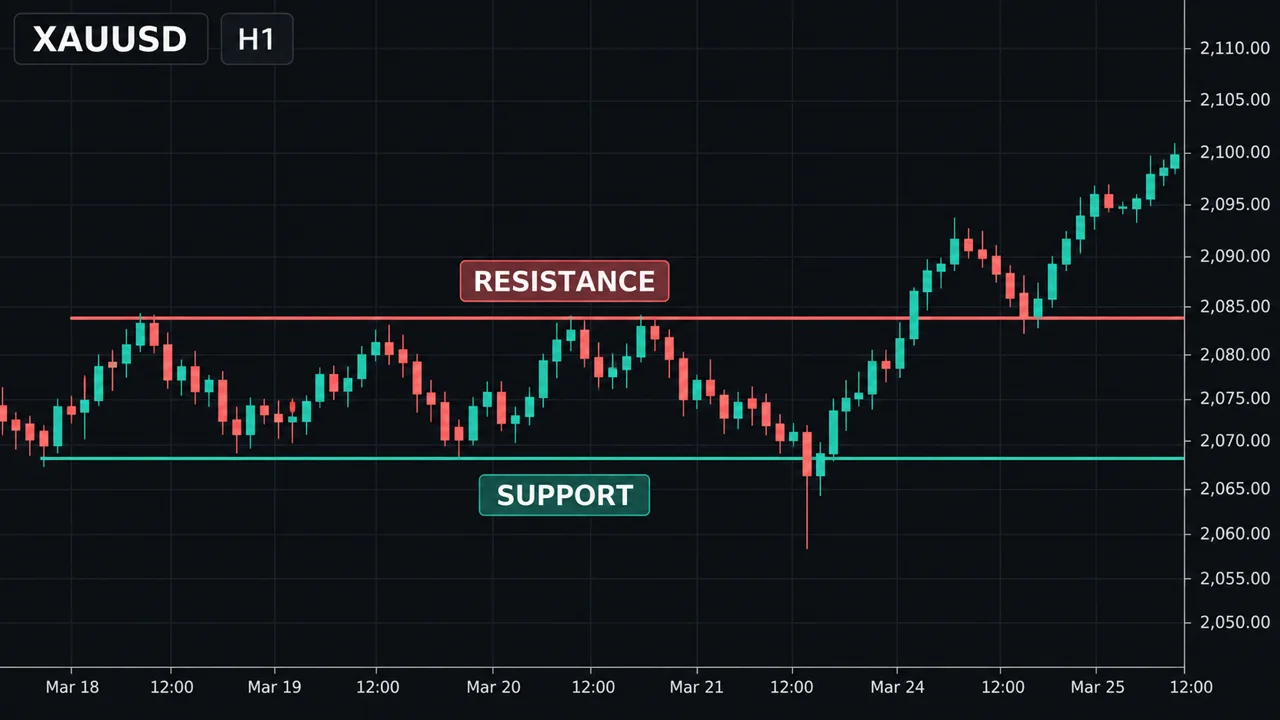
- Limit = เชื่อว่าราคาจะกลับตัวจากจุดนั้น เหมาะกับการเทรดแนวรับแนวต้าน
- Stop = เชื่อว่าราคาจะวิ่งต่อเมื่อผ่านจุดนั้น เหมาะกับการเทรดเบรกเอาต์ (Breakout)
Buy Stop Limit และ Sell Stop Limit (MT5)
MT5 มีคำสั่งผสม เมื่อราคาแตะราคา Stop ระบบจะ "วาง" คำสั่ง Limit อีกตัวไว้แทนการเข้าตลาดทันที เช่น ทองอยู่ 2,000 ตั้ง Buy Stop Limit ราคา Stop 2,010 ราคา Limit 2,006 แปลว่ารอให้ทะลุ 2,010 ก่อน แล้วค่อยรอซื้อตอนย่อกลับมา 2,006 เหมาะกับคนที่ชอบเทรดแบบทะลุแล้วรอย่อ (Breakout-Retest) แต่ถ้าราคาไม่ย่อกลับ คุณจะตกรถ
Stop Loss และ Take Profit
- Stop Loss (SL) คำสั่งปิดไม้อัตโนมัติเมื่อขาดทุนถึงจุดที่กำหนด คือเข็มขัดนิรภัยของพอร์ต
- Take Profit (TP) คำสั่งปิดไม้อัตโนมัติเมื่อกำไรถึงเป้า
SL ของไม้ซื้อทำงานที่ Bid ส่วน SL ของไม้ขายทำงานที่ Ask สิ่งนี้สำคัญ เพราะตอนสเปรดกว้าง ไม้ขายอาจโดน SL ทั้งที่กราฟ (ซึ่งมักแสดงราคา Bid) ยังไม่แตะเส้น
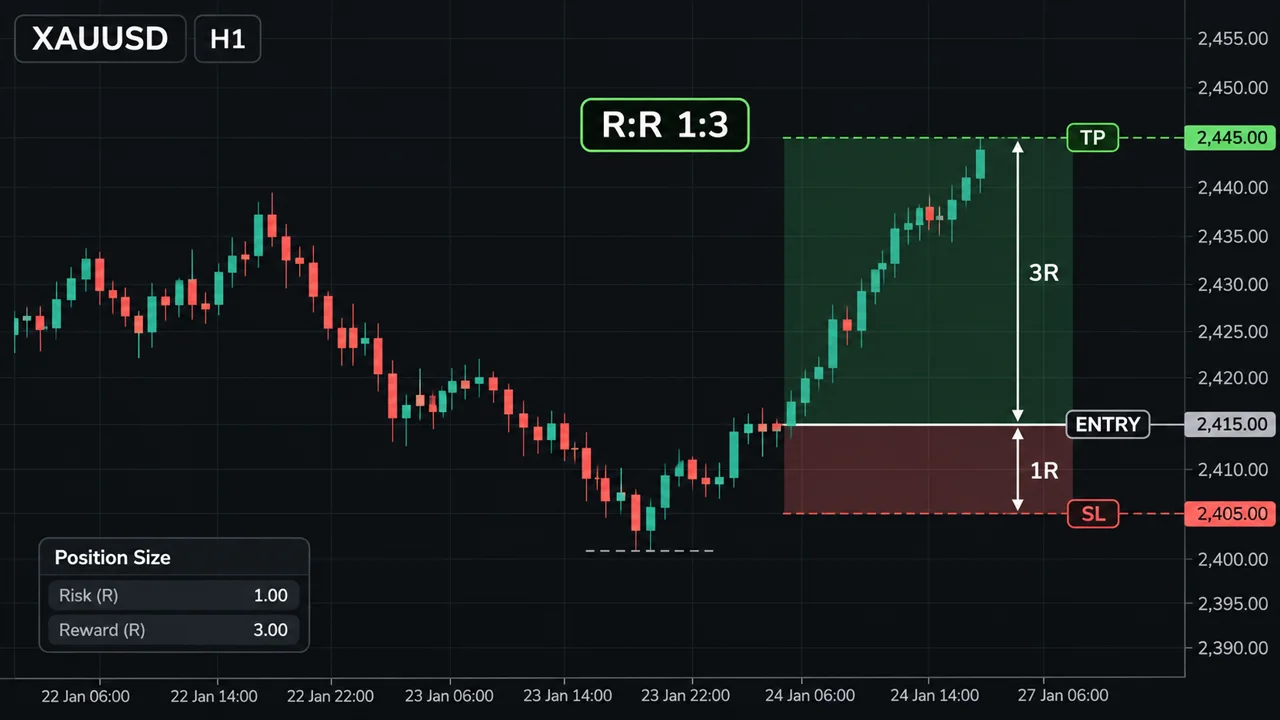
EURUSD อยู่ที่ 1.1000 คุณมองว่า 1.0970 เป็นแนวรับ ตั้ง Buy Limit 0.10 ล็อต ที่ 1.0970 SL ที่ 1.0940 TP ที่ 1.1030 ความเสี่ยง = 1.0970 − 1.0940 = 30 pips × $1 ต่อ pip (0.10 ล็อต) = $30 เป้ากำไร = 1.1030 − 1.0970 = 60 pips × $1 = $60 อัตราส่วนผลตอบแทนต่อความเสี่ยง = 60 ÷ 30 = 1:2 ถ้าราคาไม่ลงมาถึง 1.0970 ไม้นี้จะไม่ถูกเปิด และคุณไม่เสียอะไรเลย
ดูภาพด้านล่าง
ทองอยู่ที่ 2,000.00 คุณตั้ง Buy Stop 0.10 ล็อต ที่ 2,010.00 ข่าวออก ราคากระโดดผ่าน 2,010 อย่างรวดเร็ว ได้ราคาจริง 2,010.80 ต้นทุนเพิ่มจากสลิปเพจ = $0.80 × $10 (0.10 ล็อต) = $8 นี่คือราคาที่ต้องจ่ายของคำสั่ง Stop: ได้เข้าแน่นอนกว่า แต่ราคาอาจแย่กว่าที่ตั้ง
วันหมดอายุของคำสั่งรอ (Expiration)
ตอนตั้งคำสั่งรอ คุณเลือกได้ว่าจะให้คำสั่งค้างไว้จนกว่าจะยกเลิก (GTC — Good Till Cancelled) ค้างถึงสิ้นวัน หรือหมดอายุตามเวลาที่กำหนด ถ้าไอเดียของคุณใช้ได้แค่ช่วงเซสชันเดียว ควรตั้งเวลาหมดอายุไว้ จะได้ไม่มีไม้แปลก ๆ เปิดตอนตื่นมา
ขั้นตอนเลือกคำสั่ง
- สัญญาณเกิดแล้วและราคายังอยู่ใกล้จุดเข้า → Market
- อยากเข้าที่แนวรับ/แนวต้านที่ราคายังไปไม่ถึง → Limit
- อยากเข้าเมื่อราคาทะลุกรอบ → Stop
- อยากรอทะลุแล้วย่อ (MT5) → Stop Limit
- ทุกไม้ใส่ SL ตั้งแต่ตอนส่งคำสั่ง ไม่ใช่ "เดี๋ยวค่อยใส่"
จุดอ่อน / ข้อผิดพลาดที่พบบ่อย
- สลับ Limit กับ Stop ตั้ง Buy Limit เหนือราคาปัจจุบัน แอปจะไม่ยอมหรือเปิดทันทีแบบไม่ตั้งใจ ให้เช็กตารางข้างบนก่อนกดเสมอ
- คำสั่ง Stop โดนสลิปเพจในช่วงข่าว คำสั่ง Stop และ SL ไม่รับประกันราคา ในตลาดที่กระโดด (Gap) อาจปิดไกลกว่าที่ตั้งมาก
- คำสั่ง Limit ไม่ถูกเปิด ราคาเกือบถึงแล้วกลับตัว คุณพลาดไม้ดี ๆ นี่เป็นต้นทุนปกติของการรอราคาดี
- ลืมคำสั่งรอค้างไว้ สัปดาห์ต่อมาสถานการณ์เปลี่ยน แต่คำสั่งเก่าถูกเปิดขึ้นมา
- SL ใกล้เกินไปเพราะไม่คิดถึงสเปรด โดยเฉพาะไม้ขาย ที่ SL ทำงานที่ Ask
- มีจุดขั้นต่ำ (Stop Level) บางโบรกห้ามตั้ง SL/TP หรือคำสั่งรอใกล้ราคาปัจจุบันเกินกำหนด
ใช้บนมือถือ
ในแอป MT4/MT5 กด New Order แล้วเปลี่ยนประเภทจาก Market Execution เป็น Buy Limit/Sell Limit/Buy Stop/Sell Stop ได้ในช่องเดียวกัน ช่อง SL และ TP อยู่ด้านล่าง ใน MT5 สามารถลากเส้น SL/TP บนกราฟได้โดยตรง แต่บนจอเล็กลากพลาดได้ง่าย ตรวจตัวเลขในหน้าแก้ไขไม้ (Modify) ทุกครั้งหลังลาก
สรุป
- Market = เข้าทันที ไม่รับประกันราคา
- Limit = รอราคาดีกว่า (ซื้อถูก/ขายแพง) · Stop = เข้าเมื่อราคาทะลุ
- Stop Limit ใน MT5 = รอทะลุแล้วค่อยรอย่อ
- SL ไม้ซื้อทำงานที่ Bid ไม้ขายทำงานที่ Ask
- ใส่ SL ตั้งแต่ส่งคำสั่ง และตั้งเวลาหมดอายุให้คำสั่งรอที่ใช้ได้แค่บางช่วง
Many people trade for months using only the Buy and Sell buttons. The right order type lets you enter on plan without staring at the screen, and closes losing trades automatically while you sleep. This lesson covers every order type in MT4/MT5 in plain terms.
Market orders
A market order executes immediately at the current price: buy at the ask, sell at the bid.
- Pro: you are guaranteed to get in.
- Con: the price is not guaranteed. In fast markets you can be filled away from what you saw. This is slippage.
Use it when your signal has already triggered and you want in now.
The four pending orders
A pending order sets a price in advance; the platform opens the trade when price gets there. Two questions make it easy: are you buying or selling, and is your price better or worse than the current price?
| Order | Placed | Idea |
|---|---|---|
| Buy limit | Below current price | Buy cheaper (dip then bounce) |
| Sell limit | Above current price | Sell higher (rally then drop) |
| Buy stop | Above current price | Buy when price breaks up |
| Sell stop | Below current price | Sell when price breaks down |
- Limit = you expect price to turn at that level. Suits support and resistance trading.
- Stop = you expect price to keep going once it passes that level. Suits breakout trading.
Buy stop limit and sell stop limit (MT5)
MT5 offers a combined order. When price touches the stop price, the platform places a limit order instead of entering at market. For example, gold is at 2,000; you set a buy stop limit with stop price 2,010 and limit price 2,006. You wait for a break above 2,010, then wait to buy the pullback to 2,006. It suits breakout-retest traders, but if price never pulls back, you miss the move.
Stop loss and take profit
- Stop loss (SL) closes the trade automatically at a chosen loss — your account's seatbelt.
- Take profit (TP) closes the trade automatically at a chosen profit target.
A buy trade's SL triggers on the bid; a sell trade's SL triggers on the ask. This matters: when the spread widens, a sell can be stopped out while the chart (which usually shows the bid) never touches your line.
EURUSD is at 1.1000 and you see support at 1.0970. Place a buy limit, 0.10 lot, at 1.0970, SL 1.0940, TP 1.1030. Risk = 1.0970 − 1.0940 = 30 pips × $1 per pip (0.10 lot) = $30 Target = 1.1030 − 1.0970 = 60 pips × $1 = $60 Reward-to-risk = 60 ÷ 30 = 1:2 If price never comes down to 1.0970, the trade never opens and you lose nothing.
See the chart below.
Gold is at 2,000.00 and you set a buy stop, 0.10 lot, at 2,010.00. News hits and price jumps through 2,010; you are filled at 2,010.80. Extra cost from slippage = $0.80 × $10 (0.10 lot) = $8 That is the trade-off of stop orders: a surer entry, but possibly a worse price.
Pending order expiry
When placing a pending order you can keep it until cancelled (GTC — good till cancelled), until end of day, or until a set time. If your idea is only valid for one session, set an expiry so you do not wake up to a trade you no longer want.
Choosing an order, step by step
- Signal has triggered and price is still near your entry → market.
- You want to enter at support/resistance that price has not reached yet → limit.
- You want to enter when price breaks a range → stop.
- You want a break and then a pullback (MT5) → stop limit.
- Attach an SL when you send every order — not "later".
Weaknesses / common mistakes
- Mixing up limit and stop. Placing a buy limit above the current price will be rejected or fill instantly by accident. Check the table before you tap.
- Stop orders slipping during news. Stop orders and stop losses do not guarantee price. In a gap, they can fill far beyond your level.
- Limit orders not filling. Price comes close, then turns without you. That is the normal cost of waiting for a better price.
- Forgotten pending orders. A week later the situation has changed, but the old order fires.
- Stops too close because of the spread. Especially for sells, whose SL triggers on the ask.
- Minimum distance (stop level). Some brokers do not allow SL/TP or pending orders closer than a set distance to current price.
On a phone
In MT4/MT5, tap New Order and change the type from Market Execution to buy limit/sell limit/buy stop/sell stop in the same field; SL and TP sit below. MT5 lets you drag SL/TP lines on the chart, but on a small screen it is easy to drag to the wrong place — check the numbers in the Modify screen after every drag.
Summary
- Market = enter now, price not guaranteed.
- Limit = wait for a better price (buy low/sell high); stop = enter on a break.
- Stop limit in MT5 = wait for a break, then for a pullback.
- A buy's SL triggers on the bid, a sell's on the ask.
- Attach the SL when you send the order, and give session-only pending orders an expiry.